
How to join
TL;DR · Java Edition
Join with Prism Launcher
- Download Prism Launcher.
- Download the current 26.3-r19.3
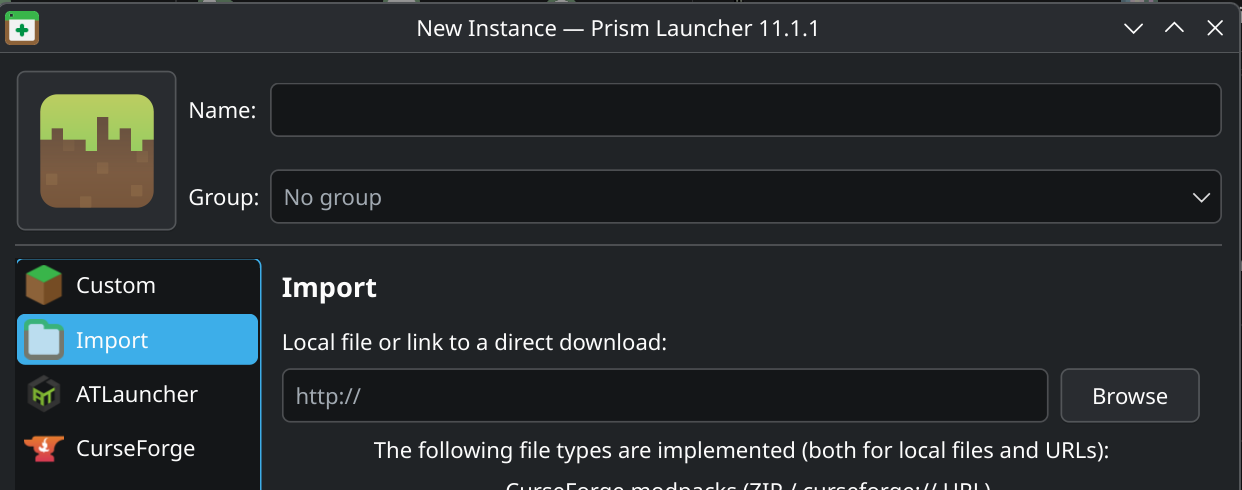
.mrpack. - In Prism, select Add Instance → Import → Browse, choose the downloaded file, and finish the import.
- Start the imported game and join
minecraft.avhaari.com. - Copy the six-character link code Minecraft shows you.
- In your approved Discord server's Minecraft bot channel, run
/minecraft link, enter the code in its code field, then rejoin.
.mrpack.Detailed Java options · Bedrock setup · Access and linking help
Choose your edition below. Access requires approval: your community’s configured access role in an approved Discord server, or a manual grant from the operator. Downloading the pack does not grant access by itself.
Server address & ports
Section titled “Server address & ports”Java Edition
Address: minecraft.avhaari.com
Port: 25565
Minecraft 26.3 · TCP
Minimum required: 26.3-r19.3. Latest recommended: 26.3-r19.3.
Bedrock Edition
Address: minecraft.avhaari.com
Port: 19132
Tested with 26.51 · UDP
Accept the server’s resource pack when prompted.
Use these addresses in Minecraft’s multiplayer menu. You do not need to open or forward ports on your own router.
Java: download & install
Section titled “Java: download & install”Use a Microsoft account that owns Minecraft Java Edition and the 26.3-r19.3 pack. Existing players can update the instance they already use. New players can import the complete modpack or use the Mods ZIP with a manually configured Fabric installation.
Already using AutoModpack? Join Avhaari and accept the update if prompted, then restart when asked. Keep the same instance so your maps and settings stay with you.
Option A: import a new Prism instance
Section titled “Option A: import a new Prism instance”Use any launcher that supports .mrpack imports. Prism Launcher is one option:
- Download the
.mrpackabove. In Prism, choose Add Instance → Import, select the file and finish the import. - Let the launcher download the required game files. Sign in with your own Microsoft account and select Java 25 if asked for a runtime.
- Launch while connected to the internet so AutoModpack can set up the bundled pack. Then join Avhaari.
Option B: make a clean manual installation
Section titled “Option B: make a clean manual installation”- Create a separate installation in your preferred launcher using Minecraft 26.3, Fabric Loader 0.19.5 and Java 25. Select these versions explicitly instead of a moving Latest release option. For the official Minecraft Launcher, use the Fabric installer, select the Client tab, choose those Minecraft and Loader versions and enable Create Profile. Other launchers have their own Fabric setup controls.
- Open that installation’s game folder. Download Mods only (.zip) and extract its contents there. Extract all folders, including
mods,automodpackandconfig, directly into the game folder. Do not create an extraminecraft/minecraftwrapper. The included updater loads the 38 managed mods fromautomodpack/client/active/mods. - Keep the included Fabric API file,
fabric-api-0.161.0+26.3.jar. Fabric Loader is selected in the launcher; Fabric API is one of the bundled managed mods. Their version numbers are different. You do not need to download another Fabric API or update individual mods separately. - Fully close Minecraft, then launch the Fabric 26.3 installation you just configured. In the official launcher, select its Fabric profile beside Play. Installing Fabric does not change an already running game or make every launcher profile use Fabric. Keep your own controls, graphics and other settings.
The Fabric installation guide shows the official launcher’s setup screens. Use this page’s exact pack versions when following it.
The pack includes Distant Horizons for distant terrain. Rendering starts off in fresh installations. Use Enable Rendering in Distant Horizons settings to turn it on. The complete Prism and loose-folder downloads include the initial Distant Horizons warning default. Existing-install updates leave the player’s current configuration untouched. Bushy-leaf visuals are not included. You choose view distance and other graphics settings in your launcher or game.
Connect
Section titled “Connect”In Minecraft, open Multiplayer → Add Server. Address: minecraft.avhaari.com. Port: 25565. If your Java client only has a server-address field, enter the address alone; it uses the default port shown here. Join once, then follow Account access below if you receive a linking code.
First launch needs the server reachable to set up the bundled pack. If it is unavailable, launch again once it is back.
The Prism import guide explains importing .mrpack files. Use the complete mod set rather than mixing individual versions. When a future update needs a new pack, it will be noted in Versions & updates.
Option C: update the instance you already use
Section titled “Option C: update the instance you already use”This is the recommended route for an existing Avhaari installation. It keeps maps, waypoints, controls, settings and other personal files in the same instance.
- Fully close Minecraft and back up the instance.
- If your instance has no AutoModpack, download Update an existing install above and extract it directly into that instance’s
minecraftfolder. - Launch the same instance and join Avhaari. Accept the update if prompted, then restart when asked and join again.
The updater manages Avhaari’s pack mods, not maps, waypoints, settings, saves, screenshots, resource packs or shaders. Unrelated player-added client mods remain, but a local mod that duplicates a managed pack mod cannot stay active beside the approved copy. Read the illustrated updater guide.
Prefer manual updates? Use one of the two complete downloads instead. Before launching without AutoModpack, move the JARs from automodpack/client/active/mods into the game’s mods folder, then remove the AutoModpack JAR and its automodpack folder; the server still accepts Java clients whose required 26.3-r19.3 pack mods pass verification. Without the updater, future changes must be installed manually from this page.
Updating an existing installation
Section titled “Updating an existing installation”Keep using the same installation to retain your controls, maps and screenshots. Install the small updater into it once; do not merge the complete loose-folder pack over an existing mod folder. Versioned filenames can leave both old and new JARs installed.
Open the illustrated Java update guide →
The updater downloads the server’s managed pack after you choose Download update on join, then asks for a restart when loader-visible files changed. Everything outside its managed mod set stays in place. You do not need to import a fresh instance for every pack release.
Current compatibility: Java players need 26.3-r19.3 or a newer compatible pack. Older packs can update through their existing updater. Manual installs should use the complete 26.3-r19.3 download; do not update individual bundled mods separately. Bedrock needs no Java pack.
The illustrated guide lists the exact folders that hold controls, maps, waypoints, distant terrain, saves, screenshots, servers, resource packs and shaders.
Optional Java tuning and the Distant Horizons warning are explained in Distant terrain. They do not require another mod download.
Previous full packs
Section titled “Previous full packs”The two previous complete packs are available below for rollback and recovery. Packs older than 26.3-r19.3 need their managed mods updated before joining. Older change notes remain in Versions & updates.
Pack 26.3-r18.1 · 31 October 2026
Minecraft 26.3 · Fabric Loader 0.19.5 · Java 25 · 38 mod components
Pack 26.3-r18 · 31 October 2026
Minecraft 26.3 · Fabric Loader 0.19.5 · Java 25 · 38 mod components
Bedrock: add the server
Section titled “Bedrock: add the server”- Sign in to your Microsoft/Xbox account in Minecraft Bedrock Edition.
- Open Play → Servers → Add Server. Use Avhaari as the name. Address:
minecraft.avhaari.com. Port:19132. - Connect and accept the required resource-pack download. No Java modpack or Fabric installation is needed. The first download can take longer than later joins.
- If you receive an account-link code, complete the steps below and reconnect.
These steps apply on devices that offer Add Server, such as Windows and mobile. Some console versions do not offer custom server entry directly.
Account access
Section titled “Account access”With Discord
Section titled “With Discord”- Ask your community’s staff which access role grants Minecraft access and make sure you have it. Each approved Discord server chooses its own role; its name can differ between communities.
- Attempt to join Minecraft. If your account is not linked, the connection message gives you a six-character code containing letters and numbers.
- In that community’s Minecraft bot channel, run
/minecraft linkand enter your code in the code field. Codes are not case-sensitive, contain no dashes and remain valid for three hours. - Reconnect to Minecraft. You normally only need to link once.
/minecraft statusin Discord shows your linked accounts.
The role is still required after linking. Java and Bedrock accounts must each be linked if you use both; their inventories are separate.
See Discord bot commands and community setup for the command reference and how to arrange the bot for another Discord server.
Unlink your account
Section titled “Unlink your account”Use /minecraft unlink in the same bot channel. If you have more than one linked Minecraft account, use the player option and choose the account from the suggestions. /minecraft status shows your current links.
Unlinking removes that account’s Discord-based access. If it has no manual access grant, it will be disconnected and cannot rejoin until approved again. Your items and progress stay saved, and any manual grant remains in place. Unlinking does not remove bans or moderation checks.
To link again, reconnect for a new code and use /minecraft link. If a manual grant lets you join without a code, ask the operator for help linking it again.
Without Discord
Section titled “Without Discord”Attempt to join, then give the six-character code privately to the server operator and ask for manual access. Once they confirm approval, reconnect. You do not need a Discord account for a manual grant.
If joining fails
Section titled “If joining fails”- Code expired: reconnect to get a current code and try again.
- Linked but denied: check your community’s configured access role, or ask the operator to check your manual grant.
- Java reports missing or incompatible mods: launch the imported Avhaari instance and check its pack version against this page.
- “This server requires Fabric Loader and Fabric API” with a namespace list: the server did not receive the expected Fabric registry-sync support. First check that you launched the Fabric installation and put the complete pack in that installation’s game folder. The listed namespaces identify server content; do not rename files to match them. If it persists, share the launcher name and the startup/error lines from that installation’s
logs/latest.logwith the operator. - Bedrock resource-pack or loading trouble: see Java & Bedrock help and report your device, game version and the exact message.
Once you are in, find your own pace or browse the installed mods.