
Apple Press

What it does
Runs two stages: mashing apples into Apple Mash, then combining mash with a Wine Bottle to produce Apple Juice. The installed press also processes honeycomb blocks and honeycomb.
What you need
- A placed Apple Press, the recipe input and a Vinery Wine Bottle for the bottling stage. No furnace fuel or external heat is needed.
How to use it
- Add apples to the left mashing input. A base mashing cycle takes 30 seconds.
- The mash collects in the lower middle slot, which also feeds the second stage. Add Wine Bottles beside it.
- The second stage takes 40 seconds at base settings. Collect the juice from the upper-right output.
Java and Bedrock
Java
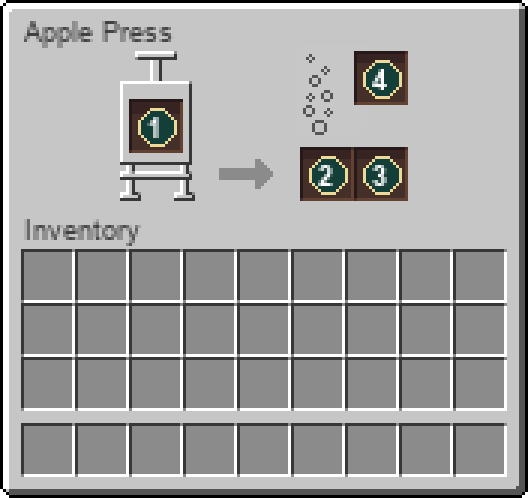
The native screen has mashing input on the left, mash and bottles below-right, and final output above them. Each stage has its own progress indicator.
Bedrock
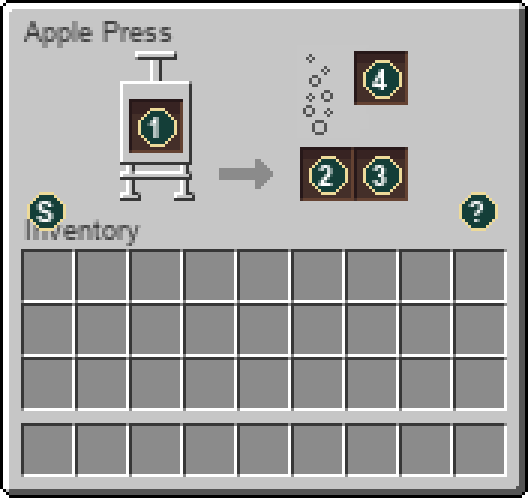
Open with your interact/use control. With the server resource pack, the Bedrock screen uses the original machine layout shown below. Select or hover the Status and Help icons for details; those icons and progress indicators are not storage slots. The same server recipes and inventory rules apply.
Slot guide
- Mashing input
- Mash output / second-stage input
- Wine Bottle input
- Final output
Not working? Check these first
- Grapes belong in the Grapevine Pot. They are not apple-press inputs.
- A filled intermediate or output slot stops that stage. Check the two stages separately.
Recipes processed here
These use the workstation after you have built it. The recipe for crafting the workstation is below. Expand a processing recipe for ingredients, tools, outputs and chances.
4 processing recipes
Apple1 × Apple Mash · 30 seconds · Apple press: mash
Workstation: Apple Press
Ingredients
- 1 ×
 Apple
Apple
Results
- 1 ×
 Apple Mash
Base processing time: 30 seconds while the machine can work.
Uses the installed Vinery processing rules. Recipe data can be changed by the server.
Honeycomb Block4 × Honeycomb · 30 seconds · Apple press: mash
Workstation: Apple Press
Ingredients
- 1 ×
 Honeycomb Block
Results
- 4 ×
 Honeycomb
Base processing time: 30 seconds while the machine can work.
Uses the installed Vinery processing rules. Recipe data can be changed by the server.
Apple Mash1 × Apple Juice · 40 seconds · Apple press: ferment
Workstation: Apple Press
Ingredients
- 1 × Apple Mash
Container:  Wine Bottle
Results
- 1 ×
 Apple Juice
Base processing time: 40 seconds while the machine can work.
Uses the installed Vinery processing rules. Recipe data can be changed by the server.
Honeycomb1 × Honey Bottle · 40 seconds · Apple press: ferment
Workstation: Apple Press
Ingredients
- 1 × Honeycomb
Container: Wine Bottle
Results
- 1 ×
 Honey Bottle
Base processing time: 40 seconds while the machine can work.
Uses the installed Vinery processing rules. Recipe data can be changed by the server.
Where to get it
- Block dropApple Press
Break or harvest this block with the appropriate tool.
How to craft this workstation
1 recipe in the installed content. Ingredient links show how to obtain the parts; expand a recipe for the full method.
Crafting grid1 × Apple Press
Workstation:  Crafting Table


Ingredients
- 1 × Iron Trapdoor
- 4 × Stick
- 1 × Barrel
Results
- 1 × Apple Press
Item properties
Stack limit64
Raritycommon
Block hardness2
Item data is tied to the installed 26.3 content. Recipe availability can change with server settings or added datapacks. Data coverage and sources.