
Feeder

What it does
Converts suitable food into stored meat, plant and fish points that compatible nearby prehistoric creatures can consume. It supplies food; it does not tame creatures or change their diets.
What you need
- A placed Feeder reachable by the creature, plus food accepted by that creature’s diet.
How to use it
- Open the Feeder and put food into the matching meat, plant or fish slot.
- Food is consumed into stored points; use the indicators to check the remaining supply.
- Keep the feeder accessible inside a suitable enclosure and replenish the appropriate food category.
Java and Bedrock
Java
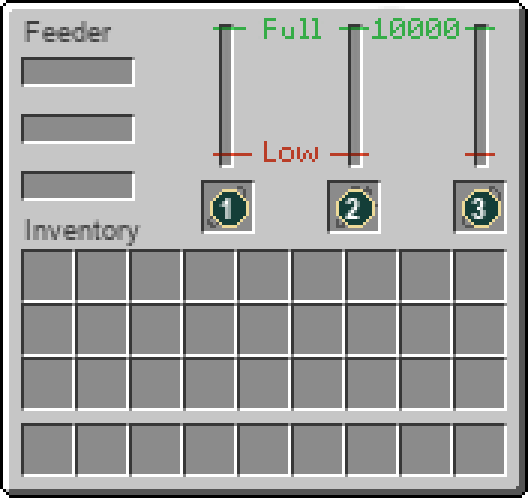
The native screen shows separate meat, plant and fish inputs and stored-food gauges.
Bedrock
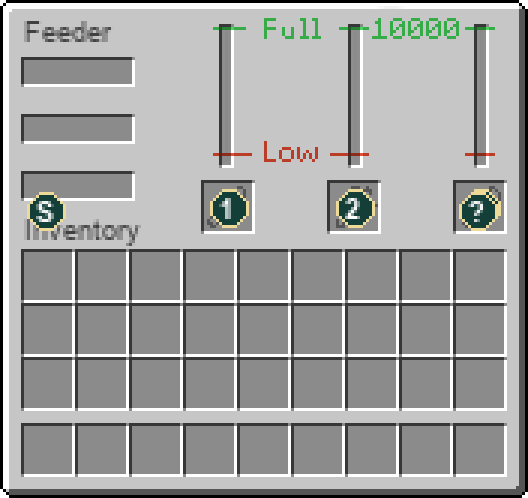
Open with your interact/use control. With the server resource pack, the Bedrock screen uses the original machine layout shown below. Select or hover the Status and Help icons for details; those icons and progress indicators are not storage slots. The same server recipes and inventory rules apply.
Slot guide
- Meat input
- Plant input
- Fish input
Not working? Check these first
- Food points are not output items you can take back out.
- Check diet and physical access if a creature remains hungry. Not every animal eats every food category.
Where to get it
- Block dropFeeder
Break or harvest this block with the appropriate tool.
How to craft this workstation
1 recipe in the installed content. Ingredient links show how to obtain the parts; expand a recipe for the full method.
Crafting grid1 × Feeder
Workstation:  Crafting Table


Ingredients
- 7 × Iron Ingot
- 1 × Hay Bale
Results
- 1 × Feeder
Item properties
Stack limit64
Raritycommon
Block hardness3
Item data is tied to the installed 26.3 content. Recipe availability can change with server settings or added datapacks. Data coverage and sources.