


Any means interchangeable ingredients. Select a group slot or read the ingredient list for the accepted options.
Ingredients
Results
- 1 ×
 Analyzer
Made with:  Crafting Table
Processes fossils, amber and other supported finds into the recipe’s possible discoveries, including DNA. A weighted recipe chooses one outcome; it does not guarantee the species you want.
1 recipe. Ingredient links show how to obtain the parts.
AnalyzerAny means interchangeable ingredients. Select a group slot or read the ingredient list for the accepted options.
Ingredients
Results
AnalyzerMade with: Crafting Table
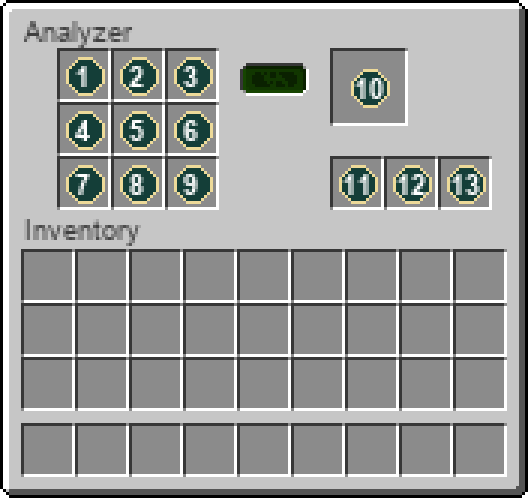
The native screen has a 3 × 3 input grid on the left and four outputs on the right.
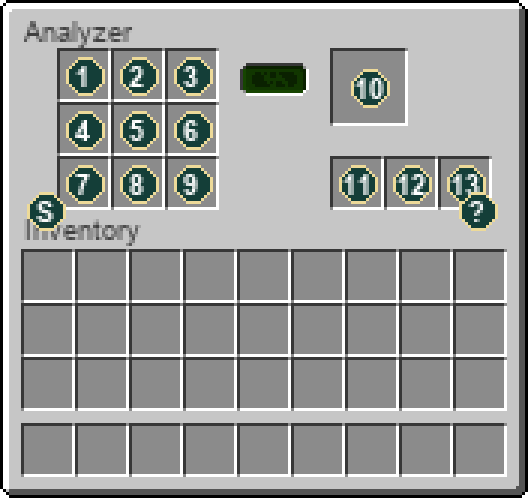
Open with your interact/use control. With the server resource pack, the Bedrock screen uses the original machine layout shown below. Select or hover the Status and Help icons for details; those icons and progress indicators are not storage slots. The same server recipes and inventory rules apply.
Search this workstation’s recipes by ingredient or result. Select a product to see how to make it on its item page.
524 results · 606 recipes
 13 possible findings from Dominican Amber Chunk1 recipe · View recipes →
Made with: Analyzer
 Cow DNA · Mooshroom DNA1 recipe · View recipes →
Made with: Analyzer
 Chicken DNA3 alternative recipes · View recipes →
Made with: Analyzer
 Cod DNA · Polar Bear DNA1 recipe · View recipes →
Made with: Analyzer
 Parrot DNA1 recipe · View recipes →
Made with: Analyzer
 98 possible findings from Failuresaurus Flesh1 recipe · View recipes →
Made with: Analyzer
Chicken DNA · Parrot DNA1 recipe · View recipes →Made with: Analyzer
41 possible findings from Bio Fossil1 recipe · View recipes →Made with: Analyzer
 38 possible findings from Plant Fossil1 recipe · View recipes →
Made with: Analyzer
 14 possible findings from Shale Fossil1 recipe · View recipes →
Made with: Analyzer
 25 possible findings from Tar Fossil1 recipe · View recipes →
Made with: Analyzer
28 possible findings from Frozen Meat1 recipe · View recipes →Made with: Analyzer
Stack limit64
Raritycommon
Block hardness3
fossil:analyzer Item data is tied to the installed 26.3 content. Recipe availability can change with server settings or added datapacks. Data coverage and sources.