A Cooking Pot over valid heat, such as a lit Stove or Campfire.
The exact recipe ingredients and serving container, commonly a bowl. The pot does not have a coal-fuel slot.
How to use it
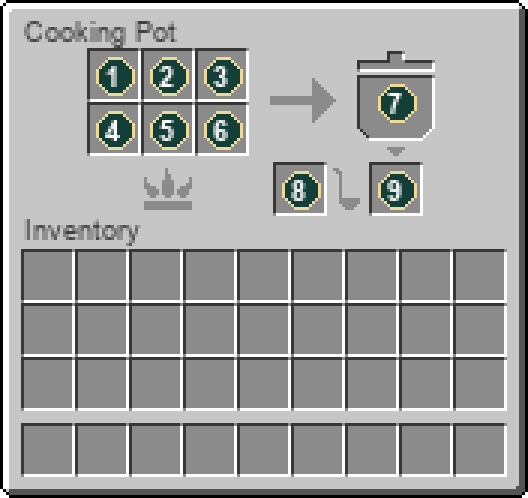
Place the pot over heat, open it and fill only the required ingredient slots in the left 2 × 3 grid.
Wait for cooking. The upper-right meal slot shows cooked food stored in the pot.
Add the serving container to the lower container slot and take the served meal from the lower-right result slot.
Java and Bedrock
Java
Java native screen. Empty interface illustration; numbered badges refer to the slot guide below.
Six ingredients are on the left. The meal display is above-right; serving containers and finished servings are below it.
Bedrock
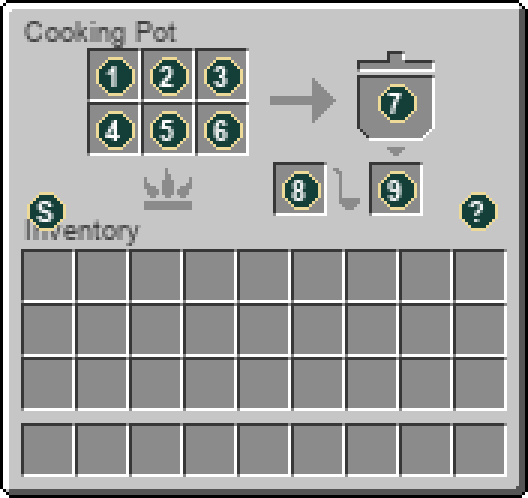
Bedrock with the server resource pack. Empty interface illustration; numbered badges refer to the slot guide below. S = Status; ? = Help.
Open with your interact/use control. With the server resource pack, the Bedrock screen uses the original machine layout shown below. Select or hover the Status and Help icons for details; those icons and progress indicators are not storage slots. The same server recipes and inventory rules apply.
Slot guide
Recipe ingredient
Recipe ingredient
Recipe ingredient
Recipe ingredient
Recipe ingredient
Recipe ingredient
Cooked meal display
Serving container input
Served meal output
Not working? Check these first
Check the heat indicator first.
Extra ingredients can prevent matching. Keep serving containers separate from ingredients.
The meal display is not an ordinary ingredient slot. Take prepared servings from the output.


 Brick
 Wooden Shovel
 Cooking Pot
 Crafting Table